Introducing Arc: Why we built a new programming language
From Excel sheets to Python to Lua, nothing quite worked. So we built our own language for hardware automation.

A month ago we released the first version of our new controls and automation language: Arc. To make this project a reality, we built a parser, analyzer, compiler, runtimes in two languages, and an LSP to power editor diagnostics.
In total, the first release of Arc includes 100,000 lines of carefully architected code, all written by a small team of engineers while supporting the rest of our platform.
This raises the question: why build our own programming language for automation and controls? Why not use something existing like Python? Or an industrial language like Structured Text (ST)?
The short answer is: we did. We actually tried twice to get around building our own language. Here’s the story of why those two attempts weren’t enough, and the problems that drove us to implement Arc.
The need for automation
If you don’t already know, Synnax is a test and industrial control platform. It replaces tools like LabVIEW and Ignition.
We hook up to sensors and actuators from data acquisition devices and industrial controllers, provide operators with visualization and manual operation tools, and critically enable engineers to write scripts for automating repetitive, safety critical, or time sensitive operations.
We tackled the first two pieces of functionality as a foundation, and left designing an automation system as one of the final features before the first release of Synnax.
Our team has a pedigree in Aerospace engineering. We’re evenly split between the worlds old and new space. We’d all written automations for firing rocket engines, running structural tests, or validating avionics. Several of us had written the underlying software to run the automations. Across all of our journeys there was one dominant paradigm: Excel was being stretched further than expected.
The early SpaceX way: Sequences in Excel sheets
SpaceX did and still does use Excel to write automation sequences for their Falcon vehicles. I should note: I didn’t work at SpaceX, and although some of our engineers did, they weren’t there during the Falcon 1 days. Most of what I write here is secondhand knowledge passed through word of mouth.
Sequence steps are written as rows in the sheet. Each row has an instruction keyword: open this actuator, check this condition, and, critically, go-to this step. They would feed this Excel sheet into a LabVIEW program that would check it for errors, and then execute the sequences within a bespoke runtime.
| Step | Instruction | Target | Value | Go-to |
|---|---|---|---|---|
1 | OPEN | press_valve | ||
2 | CLOSE | vent_valve | ||
3 | CHECK_GE | pressure | 500 | |
4 | CLOSE | press_valve | ||
5 | WAIT | 5s | ||
6 | CHECK_GE | pressure | 490 | 1 |
7 | OPEN | vent_valve |
As it turns out, Excel ended up being so good at its job that it was used as the ground launch sequencer for Falcon and Dragon, the first crewed flights off of US soil since the space shuttle. Here’s why it shined:

NASA mission control during the SpaceX Demo-2 launch. Credit: NASA/Joel Kowsky
Benefit 1 -> Familiarity
It makes it easy for non-software engineers to write sequences because they use a familiar program with a restricted set of keywords.
Benefit 2 -> Readability
It’s easy to read for step-based sequencing. Each row is a new, logical instruction uncluttered by complex control flow.
Benefit 3 -> Determinism
Because everything is executed in LabVIEW, you can run it on one of NI’s real-time targets (like a cRIO) and get deterministic cycle times.
Benefit 4 -> Tooling
You don’t need to support extensive tooling for a custom programming language: the editor exists, parsing the sheet is easy, and you can rely on a trusted host runtime.
Writing sequences at Firefly
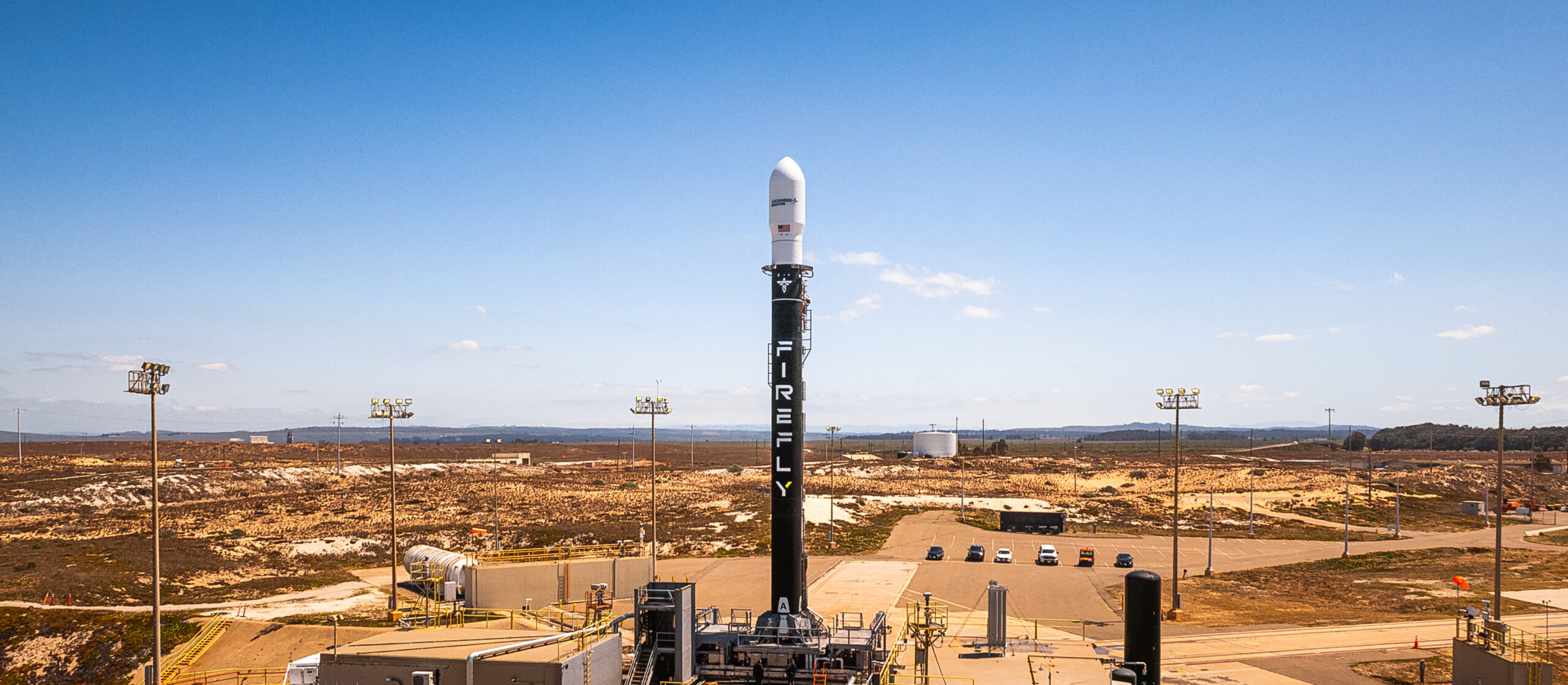
Firefly’s Alpha launch vehicle ahead of flight 6. Credit: Firefly Aerospace
As the new space revolution took shape, ex-SpaceX founders started launch vehicle, satellite, and propulsion companies, and they brought Excel-based sequencing with them. I encountered one of these second-generation sequencers during my time at Firefly Aerospace, where I wrote my first sequence for pressure testing a Stage 2 liquid Oxygen tank, and where I met one of our engineers, Nico.
Nico was involved in the development of the ground software systems, and maintained the infrastructure that was actually used to execute the sequences I wrote. I remember many nights of testing where our team would call Nico to make a software change.
When I eventually transitioned into a software role, he and I became friends running stress tests on our infrastructure at 3 AM when it wasn’t being used for operations.
Over my time on the test engineering team, I started to write, review, and edit progressively more complex spreadsheet sequences. Hundreds of lines with nested go-to statements and different breakout cases such as holds and aborts that were isolated across different tabs or even different sheets entirely.
The more I worked with them, the more the cracks started to show.
Downside 1 -> Diffing
Excel files are not git diffable by default, and reviewing changes to these automations was impossible in a standard pull request viewer. If you have a large sequence across multiple tabs and someone makes an edit, how do you know what edit they made? If two people were working on the same sequence and wanted to check them in, how did you resolve conflicts?
This became such a significant problem that Nico himself built an internal tool to diff Excel files.
Downside 2 -> Readability degrades with complexity
Large or complex sequences were hard to read: needless to say, there is a reason that go-to statements have largely been removed from modern, high level languages. You’re on row 47, it says go-to 12. You scroll up, Row 12 has a conditional that jumps to row 83 on a different tab. Now you’re three levels deep and lost.
Downside 3 -> Editing experience
As a software engineer, this one hit me the hardest. You’d make an edit to a sequence on your work machine, upload it to a shared drive, walk to a different room with the computer that had the LabVIEW sequencing program on it, load it up, find errors, and walk back to fix them. With C++ in a modern IDE, my editor tells me that I made a mistake the moment I type it. With Excel sequences, every typo could cost a round trip down the hall.
Attempt 1 -> Python
After years of writing sequences in spreadsheets, we knew we didn’t want to build another one. But we were a startup, and the mandate was simple: build something that works and get it into the hands of our users. We already had a Python SDK for importing data into Synnax, so extending it with a few useful functions for building automations felt like the obvious move.
with client.control.acquire(
    name="My Sequence",
    read=["pressure"],
    write=["valve_cmd"]
) as controller:
    # open valve
    controller["valve_cmd"] = True
    # wait for pressure to rise
    controller.wait_until(lambda c: c["pressure"] > 20)
    # close the valve
    controller["valve_cmd"] = False
There were only two fundamental operations we had to implement: wait for a condition and set a value on a channel. All other operations were built using standard Python based on these primitives.
This approach worked surprisingly well. Over the course of the last few years, we’ve had engineers use our Python sequences to control manufacturing processes, launch rockets, and test electronics.
The beauty of our Python-based sequences was how easy they were to support. All we had
to do was write about 400 lines of code to implement the controller logic and we were
off to the races. Want to implement looping? Write a for loop. Want to do a fluid
calculation? Import coolprop. Vibration analysis? Easy, use scipy.fft.
With a relatively simple implementation, we allowed engineers to use the full power of the Python ecosystem to automate anything. In fact, our Python sequencing system was so well received that we will continue to support it into the future.
Problems with Python
Unfortunately, no software survives prolonged contact with the outside world. As the use cases expanded, we started to build up a healthy list of problems with our Python-based approach.
Problem 1 -> Determinism
When expensive things that explode are on the line, timing and safety are absolutely critical. Python is garbage collected, interpreted, and we were doing control via TCP connections. Existing users and potential customers were constantly asking for more performance and safety.
Problem 2 -> Ease of use and integration
To run our Python-based sequences, you had to manually start scripts in a separate terminal. Managing multiple automations in various terminals alongside our operator Console is a pretty terrible experience when you’re stressed about things exploding. We were asked constantly to make it possible to manage automations from within the Console directly.
Problem 3 -> It’s still programming
Most new grads studied MATLAB and/or Python in college, but even then, they probably
wouldn’t be able to understand what a lambda expression was. Python isn’t as user
friendly as an excel sheet.
Problem 4 -> Concurrency
It’s very common to want to do many things at once. Open this valve and wait while checking for these 5 different abort scenarios. Control the pressure in these two tanks at the same time while listening for an operator hold. Expressing concurrency in Python is hard and error prone.
Attempt 1.5 -> Embedding a Python interpreter
In February of 2025, we tried to solve problem #2 by embedding a full blown Python interpreter directly into the main program that runs the Synnax Core. This wasn’t just about automation, we were also working on implementing a calculated channel engine. The pitch was compelling: full power of the Python ecosystem without needing to implement our own language or runtime.
The problem started when we tried to embed CPython into our Go core. You can’t just take a CPython implementation and call it from Go, especially cross-platform. Memory sharing was a nightmare. We tried shared pages. We floated managing a completely separate Python process and communicating over RPC. We even considered compiling Python from scratch ourselves. We spent two months fighting a constant battle of solving one problem only to recreate an old one along with two new ones. We gave up and scrapped the idea entirely.
Through this journey we gained conviction that embedding a language was the right idea, but that Python wasn’t the right candidate.
Attempt 2 -> Lua embedded in C++
During this time, a large potential customer had asked us to implement support for running high-performance sequences directly on NI Linux Real-Time. After the Python embedding fiasco, I started doing research on the available options for implementing our own table/text based sequencer. On an early Sunday morning in late March 2025, I remembered using Lua to set up neovim, and realized it might be the perfect candidate.
It was written in C, easy to compile across platforms, and designed for embedding. We could also theoretically get soft real-time performance by restricting the language features, using pthread scheduling and budget allocations. Most importantly, it meant we didn’t have to build our own language. In truth: I think our team was scared of the development overhead and maintenance burden of a DSL.
After a few hours of prototyping we got the basics to work across all three major platforms. After a few weeks, we had a working sequencer within our C++ drivers and a Go-based Lua implementation for our calculated channel engine.
  if iteration == 1 then
      state = "pressurizing"
  end

  if tank_pressure == nil then return end

  if state == "pressurizing" then
      if tank_pressure < 50 then
          set("press_vlv_cmd", true)
          set("vent_vlv_cmd", false)
      else
          state = "holding"
          hold_start = elapsed_time
      end
  elseif state == "holding" then
      if elapsed_time - hold_start > 5 then
          state = "venting"
      end
  elseif state == "venting" then
      if tank_pressure > 3 then
          set("press_vlv_cmd", false)
          set("vent_vlv_cmd", true)
      end
  end
The most notable difference from Python is that Lua sequences were state machines.
Instead of a set of steps, the engineer would define an execution rate i.e. 100 Hz.
Then, when the sequence would run, the entire script would run 100 times a second.
Waits were largely implemented by a global elapsed_time variable which told you the
time since the sequence was started.
We had achieved our goal: users could deploy sequences on embedded targets, syntax highlighting and diagnostics in the Console, and use simple play and pause button. But months after release, our users barely touched it. We continued to receive constant questions and feedback about Python based sequences, while Lua got silence. Complaints are a mixed bag; they usually mean users care enough to want the tool to be better. Silence means no one cares enough to use it.
We started to dig into why the Lua strategy fell flat.
Problem 1 -> Engineers think in steps, not states
Although most programs are, under the hood, state machines, users like sequences. When
an engineer writes a procedure on a whiteboard, they write a list of steps. First, open
the press valve, then wait for pressure to reach 100 psi, then close it. With Lua, they
had to translate it into a sequence of states and transitions. Do this at the start
became a hacky if iteration == 1 then. Even simple automations quickly became a soup
of control flow.
Problem 2 -> Manual channel declaration
Lua didn’t have a concept of the hardware domain. Users had to manually declare every channel they wanted to read from or write to in a separate configuration, then reference those same channels by a string inside their code. A typo in a channel name wouldn’t surface until the sequence actually ran.
Problem 3 -> It’s still programming, and Lua’s syntax added friction
Engineers already knew Python. They didn’t want the state machine model, and on top of
that, the syntax was obscure and unfamiliar. The if ... then ... end blocks and weird
variable declarations were nothing like they’d seen in Python or tables. They had very
little reason to switch from Python to something clunkier.
Although our Lua-based calculated channels gained user traction, their automation equivalent quickly became a party trick used during demos, but delivered little value in production.
Attempt 3 -> Arc
When we went back to the drawing board for the third time our approach was different. With Python and Lua we took the approach of building something that worked while pawning off as much of the work needed to implement it as possible.
This time, we thought differently. If we wanted to set the standard for a new industrial automation language, what would it look like?
In our design, we were armed with three pieces of information: what we’d seen in industry, what we’d learned from our wounds and feedback of previous iterations, and extensive user interviews and research from the wider world of industrial automation.
We established the following requirements:
Principle 1 -> The language has to be diffable in plain text
The ability to version control and review the differences between automations as a formal release process is critical for modern engineering teams. Solely graphical and/or table based representations cannot be diffed by standard tools such as git.
Principle 2 -> Progressive introduction of complexity and power
Writing simple control sequences should be as simple as possible. Expressing a series of timed steps should be as straightforward as writing a list of items on a napkin.
As operators and engineers become more comfortable with the language, it should not hold them back. Full-blown functional programming is possible, with sophisticated control flow, layers of abstraction, and built-in support for vector operations.
It should be natural to express abort scenarios, system holds, fault tolerant states, and other sophisticated logic.
We named this principle a ‘progressive’ language. One that requires a minor subset of keywords and knowledge to run most simple tasks, but does not hold the user back as they grow.
Principle 3 -> Simple concurrency
Concurrency is one of the most challenging aspects of automations. Engineers often ask us: How do I write that I simultaneously want to be controlling pressure in this tank and that tank, while also checking a number of abort conditions, and a manual operator hold/abort?
Standard thinking lends us to two options: long state machines with lots of conditions
changed by nested switch or if-else statements, or threading logic to run truly
independent processes that then share state by communicating.
The first option is ugly, inflexible, and difficult to manage. The second requires a talented software engineer to develop the system without accidentally introducing catastrophic bugs. There has to be a better way.
Principle 4 -> Statically prevent dangerous mistakes
All automation (and even general purpose programming) languages have to make some degree of tradeoff between safety, performance, and power. We’re constantly asking ourselves the question: should we let our users do this? How often should we enable a new, fancy workflow if it increases the likelihood of catastrophic failure?
Through static analysis, we can guide the user towards safer workflows. We can identify potential locations of infinite recursion, prevent unbounded memory use, and even pre-calculate the number of instructions required to run a safety critical sequence.
By providing powerful tools, we can’t completely eliminate safety risks, but we can at least make sure the user is consciously aware of the dangerous actions they may be taking.
Principle 5 -> Portable execution
One of Synnax’s most important strengths is its ability to integrate and operate heterogeneous hardware systems. A new automation engine should not be architected for a single hardware architecture (e.g. an NI cRIO or a Beckhoff PLC). Instead, its design allows it to be deployed on a variety of different targets with as little difference in runtime implementation as possible.
A taste of Arc’s design
Here is a simple pressurization sequence expressed as an Arc program:
sequence main {
    stage pressurizing {
        1 -> press_valve_cmd
        0 -> vent_valve_cmd
        pressure > 100psi => next
    }
    stage waiting {
        0 -> press_valve_cmd
        wait{duration=5s} => next
    }
    stage venting {
        1 -> vent_valve_cmd
        pressure < 5psi => next
    }
    stage complete {
        0 -> press_valve_cmd
        0 -> vent_valve_cmd
    }
}
When developing this syntax, we thought about what the comparable napkin would look like:
- Open the pressurization and vent valves.
- Wait until the pressure reaches 100 psi, then continue.
- Close the press valve.
- Wait 5 seconds, then continue.
- Open the vent valve.
- Wait until the pressure drops below 5 psi, then continue.
- Close the vent and press valves.
Now let’s say we want to handle an overpressure condition. Let’s start with the napkin this time:
- Open the pressurization and vent valves.
- Wait until the pressure reaches 100 psi, then continue. At the same time, if the
temperature exceeds 35°C, abort.
- If we aborted, close the pressurization and vent valves.
- Close the press valve.
- Wait 5 seconds, then continue.
- Open the vent valve.
- Wait until the pressure drops below 5 psi, then continue.
- Close the vent and press valves.
- If the pressure exceeds 150 psi, abort.
Now here’s the Arc code for this sequence:
sequence main {
    stage pressurizing {
        1 -> press_valve_cmd
        0 -> vent_valve_cmd
        temp > 35C => abort
        pressure > 100psi => next
    }
    stage waiting {
        0 -> press_valve_cmd
        wait{duration=5s} => next
    }
    stage venting {
        1 -> vent_valve_cmd
        pressure < 5psi => next
    }
    stage complete {
        0 -> press_valve_cmd
        0 -> vent_valve_cmd
    }
    stage abort {
        0 -> press_valve_cmd
        0 -> vent_valve_cmd
    }
}
We didn’t design the language to be as simple as possible. We designed it to be simple enough for most engineers to learn simple sequence writing over the course of an hour, while making sure we didn’t limit the syntax choices for more powerful use cases.
What’s next
For two years and two failed attempts we tried to avoid building a language by borrowing someone else’s. Each lesson was learned through hard fought implementation and sitting next to engineers using our tool.
This post covered the journey up to a key decision. In the next one, I’ll get into the
language design itself. Why did we choose stages and functions? Why use arrow signs like
-> and =>? How does the Arc scheduler handle data integrity and concurrency without
threads?
If you want to try Arc today, it’s available in the latest release of Synnax. If this journey resonates and you’re interested in how we can help with your endeavors, book a demo with us.