Build a device driver
Creating custom hardware integrations with device drivers.
While the Synnax Driver is great for the devices it supports, you may need to integrate your own hardware with Synnax. This guide walks you through building a reliable, performant driver using the client libraries. The guide uses an Arduino as an example, but the patterns apply to any serial-based device.
Prerequisites
Before starting, ensure you have:
- Synnax Core running (installation guide)
- Synnax Console installed (get started)
- Arduino IDE (download) - any Arduino board works (this guide uses an Arduino Mega 2560)
Python
TypeScript
- Python 3.12+ with the Synnax client:
pip install synnax- pyserial package:pip install pyserial
- Node.js 18+ with the Synnax client:
npm install @synnaxlabs/client- serialport package:npm install serialport @serialport/parser-readline
Read-only driver
This section sets up the Arduino to continuously read from an analog input and send the value over serial. The driver script captures each incoming value and writes it to a channel in Synnax.
Step 1 Arduino code
Upload this code to your Arduino.
const int analogPin = A0;

void setup() {
  Serial.begin(9600);
}

void loop() {
  float analogValue = analogRead(analogPin);
  Serial.println(analogValue);
  delay(100); // ~10Hz sampling rate
}
Step 2 Serial connection
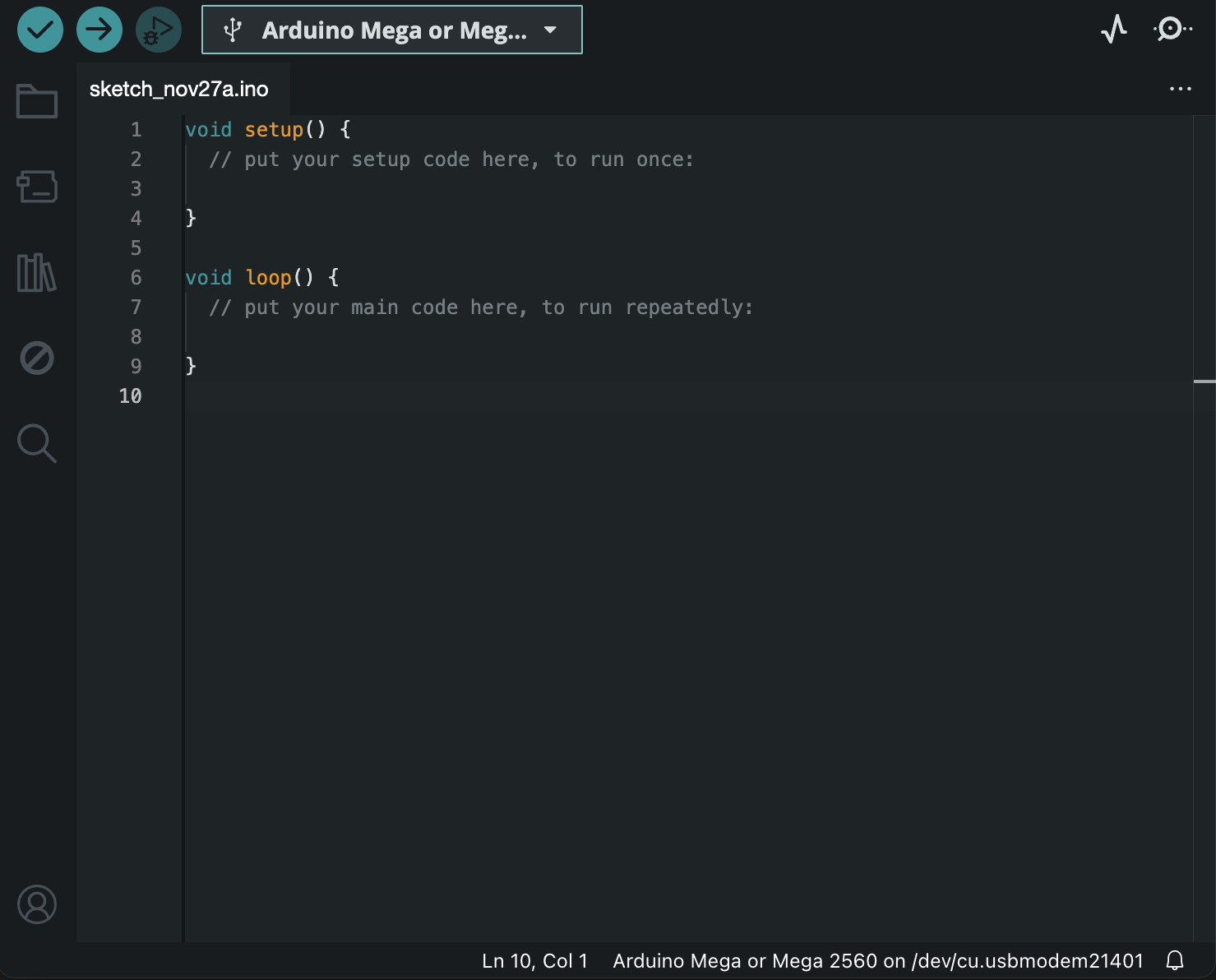
Create a driver file. Find your Arduino’s port in the Arduino IDE (top-right corner when connected via USB).
Python
TypeScript
import serial

PORT = "/dev/ttyACM0"  # Update with your port
BAUD_RATE = 9600

ser = serial.Serial(PORT, BAUD_RATE)
if ser.is_open:
    print("Serial connection established")
import { SerialPort } from "serialport";
import { ReadlineParser } from "@serialport/parser-readline";
const PORT = "/dev/ttyACM0"; // Update with your port
const BAUD_RATE = 9600;
const port = new SerialPort({ path: PORT, baudRate: BAUD_RATE });
const parser = port.pipe(new ReadlineParser({ delimiter: "\n" }));
port.on("open", () => console.log("Serial connection established"));Step 3 Reading from Arduino
Read values in a loop.
Python
TypeScript
while True:
    value = float(ser.readline().decode("utf-8").rstrip())
print(value)parser.on("data", (line: string) => {
const value = parseFloat(line.trim());
console.log(value);
});Step 4 Setting up Synnax client
Create a client and two channels - an index channel for timestamps and a data channel for values.
Python
TypeScript
import synnax as sy

client = sy.Synnax(
    host="localhost",
    port=9090,
    username="synnax",
    password="seldon",
)

index_channel = client.channels.create(
    name="arduino_time",
    is_index=True,
    data_type="timestamp",
    retrieve_if_name_exists=True,
)

data_channel = client.channels.create(
    name="arduino_value",
    index=index_channel.key,
    data_type="float32",
    retrieve_if_name_exists=True,
)
import Synnax, { DataType } from "@synnaxlabs/client";
const client = new Synnax({
host: "localhost",
port: 9090,
username: "synnax",
password: "seldon",
});
const indexChannel = await client.channels.create({
name: "arduino_time",
isIndex: true,
dataType: DataType.TIMESTAMP,
retrieveIfNameExists: true,
});
const dataChannel = await client.channels.create({
name: "arduino_value",
index: indexChannel.key,
dataType: DataType.FLOAT32,
retrieveIfNameExists: true,
});Step 5 Writing to Synnax
Open a writer and stream data.
Python
TypeScript
with client.open_writer(
    start=sy.TimeStamp.now(),
    channels=["arduino_time", "arduino_value"]
) as writer:
    while True:
        value = float(ser.readline().decode("utf-8").rstrip())
        writer.write({
            "arduino_time": sy.TimeStamp.now(),
            "arduino_value": value,
        })
import { TimeStamp } from "@synnaxlabs/client";
const writer = await client.openWriter({
start: TimeStamp.now(),
channels: ["arduino_time", "arduino_value"],
});
parser.on("data", async (line: string) => {
const value = parseFloat(line.trim());
await writer.write({
arduino_time: TimeStamp.now(),
arduino_value: value,
});
});
// Remember to close the writer when done
process.on("SIGINT", async () => {
await writer.close();
process.exit();
});Python
TypeScript
driver_read.py
import synnax as sy
import serial

PORT = "/dev/ttyACM0"
BAUD_RATE = 9600

client = sy.Synnax(
    host="localhost",
    port=9090,
    username="synnax",
    password="seldon",
)

index_channel = client.channels.create(
    name="arduino_time",
    is_index=True,
    data_type="timestamp",
    retrieve_if_name_exists=True,
)

data_channel = client.channels.create(
    name="arduino_value",
    index=index_channel.key,
    data_type="float32",
    retrieve_if_name_exists=True,
)

ser = serial.Serial(PORT, BAUD_RATE)
if not ser.is_open:
    raise ConnectionError("Failed to establish serial connection")

with client.open_writer(
    start=sy.TimeStamp.now(),
    channels=["arduino_time", "arduino_value"],
) as writer:
    while True:
        value = float(ser.readline().decode("utf-8").rstrip())
        writer.write({
            "arduino_time": sy.TimeStamp.now(),
            "arduino_value": value,
        })
driver_read.ts
import Synnax, { DataType, TimeStamp } from "@synnaxlabs/client";
import { SerialPort } from "serialport";
import { ReadlineParser } from "@serialport/parser-readline";

const PORT = "/dev/ttyACM0";
const BAUD_RATE = 9600;

const client = new Synnax({
  host: "localhost",
  port: 9090,
  username: "synnax",
  password: "seldon",
});

const indexChannel = await client.channels.create({
  name: "arduino_time",
  isIndex: true,
  dataType: DataType.TIMESTAMP,
  retrieveIfNameExists: true,
});

const dataChannel = await client.channels.create({
  name: "arduino_value",
  index: indexChannel.key,
  dataType: DataType.FLOAT32,
  retrieveIfNameExists: true,
});

const port = new SerialPort({ path: PORT, baudRate: BAUD_RATE });
const parser = port.pipe(new ReadlineParser({ delimiter: "\n" }));

port.on("error", (err) => {
  throw new Error(`Failed to open serial port: ${err.message}`);
});

const writer = await client.openWriter({
  start: TimeStamp.now(),
  channels: ["arduino_time", "arduino_value"],
});

parser.on("data", async (line: string) => {
  const value = parseFloat(line.trim());
  await writer.write({
    arduino_time: TimeStamp.now(),
    arduino_value: value,
  });
});

process.on("SIGINT", async () => {
  await writer.close();
  process.exit();
});
Step 6 Console plot
With the script running, set up a line plot in the Console:
Write-only driver
This section covers receiving commands from Synnax to control digital outputs on the Arduino.
Step 1 Arduino code
Upload this code (uses the built-in LED on pin 13).
const int digitalPin = 13;

void setup() {
  Serial.begin(9600);
  pinMode(digitalPin, OUTPUT);
}

void loop() {
  if (Serial.available() > 0) {
    char command = Serial.read();
    if (command == '1') {
      digitalWrite(digitalPin, HIGH);
      Serial.println("ON");
    } else if (command == '0') {
      digitalWrite(digitalPin, LOW);
      Serial.println("OFF");
    }
  }
  delay(10);
}
Step 2 Synnax command channel
Create a virtual command channel. Virtual channels do not store historical values. As a consequence, an index channel is not needed.
Python
TypeScript
command_channel = client.channels.create(
    name="arduino_command",
    data_type="uint8",
    virtual=True,
    retrieve_if_name_exists=True,
)
const commandChannel = await client.channels.create({
name: "arduino_command",
dataType: DataType.UINT8,
virtual: true,
retrieveIfNameExists: true,
});Step 3 Streaming commands
Open a streamer to receive commands and write them to serial.
Python
TypeScript
with client.open_streamer(["arduino_command"]) as streamer:
for frame in streamer:
command = str(frame["arduino_command"][0])
ser.write(command.encode("utf-8"))const streamer = await client.openStreamer(["arduino_command"]);
for await (const frame of streamer) {
const command = String(frame.get("arduino_command").at(0));
port.write(command);
}Python
TypeScript
driver_write.py
import synnax as sy
import serial
PORT = "/dev/ttyACM0"
BAUD_RATE = 9600
ser = serial.Serial(PORT, BAUD_RATE)
if not ser.is_open:
raise ConnectionError("Failed to establish serial connection")
client = sy.Synnax(
host="localhost",
port=9090,
username="synnax",
password="seldon",
)
command_channel = client.channels.create(
name="arduino_command",
data_type="uint8",
virtual=True,
retrieve_if_name_exists=True,
)
with client.open_streamer(["arduino_command"]) as streamer:
for frame in streamer:
command = str(frame["arduino_command"][0])
ser.write(command.encode("utf-8"))driver_write.ts
import Synnax, { DataType } from "@synnaxlabs/client";
import { SerialPort } from "serialport";
const PORT = "/dev/ttyACM0";
const BAUD_RATE = 9600;
const port = new SerialPort({ path: PORT, baudRate: BAUD_RATE });
port.on("error", (err) => {
throw new Error(`Failed to open serial port: ${err.message}`);
});
const client = new Synnax({
host: "localhost",
port: 9090,
username: "synnax",
password: "seldon",
});
const commandChannel = await client.channels.create({
  name: "arduino_command",
  dataType: DataType.UINT8,
  virtual: true,
  retrieveIfNameExists: true,
});
const streamer = await client.openStreamer(["arduino_command"]);

for await (const frame of streamer) {
  const command = String(frame.get("arduino_command").at(0));
  port.write(command);
}Step 4 Console control
Set up a switch on a schematic.
Read-write driver
You may have noticed the previous section set both “State” and “Command” to the same channel. This works, but has a problem: if the driver stops, clicking the switch still appears to work (it toggles visually) even though nothing happens on the hardware.
The solution is to use separate channels: a command channel for sending commands, and a state channel that reflects the actual hardware state. The switch only updates when the state channel confirms the change.
Step 1 Arduino code
This code reads commands, controls the output, and sends back both state and analog values.
const int digitalPin = 13;
const int analogPin = A0;
int state = 0;

void setup() {
  Serial.begin(9600);
  pinMode(digitalPin, OUTPUT);
}

void loop() {
  if (Serial.available() > 0) {
    char command = Serial.read();
    if (command == '1') {
      digitalWrite(digitalPin, HIGH);
      state = 1;
    } else if (command == '0') {
      digitalWrite(digitalPin, LOW);
      state = 0;
    }
  }
  float analogValue = analogRead(analogPin);
  String output = String(state) + "," + String(analogValue);
  Serial.println(output);
  delay(10);
}
Step 2 Synnax channels
Create four channels: command, time, state, and value.
Python
TypeScript
arduino_command = client.channels.create(
    name="arduino_command",
    data_type="uint8",
    virtual=True,
    retrieve_if_name_exists=True,
)

arduino_time = client.channels.create(
    name="arduino_time",
    is_index=True,
    data_type="timestamp",
    retrieve_if_name_exists=True,
)

arduino_state = client.channels.create(
    name="arduino_state",
    index=arduino_time.key,
    data_type="uint8",
    retrieve_if_name_exists=True,
)

arduino_value = client.channels.create(
    name="arduino_value",
    index=arduino_time.key,
    data_type="float32",
    retrieve_if_name_exists=True,
)
const arduinoCommand = await client.channels.create({
name: "arduino_command",
dataType: DataType.UINT8,
virtual: true,
retrieveIfNameExists: true,
});
const arduinoTime = await client.channels.create({
name: "arduino_time",
isIndex: true,
dataType: DataType.TIMESTAMP,
retrieveIfNameExists: true,
});
const arduinoState = await client.channels.create({
name: "arduino_state",
index: arduinoTime.key,
dataType: DataType.UINT8,
retrieveIfNameExists: true,
});
const arduinoValue = await client.channels.create({
name: "arduino_value",
index: arduinoTime.key,
dataType: DataType.FLOAT32,
retrieveIfNameExists: true,
});Step 3 Combined read-write loop
Stream commands while writing state and values.
Python
TypeScript
with client.open_streamer(["arduino_command"]) as streamer:
with client.open_writer(
start=sy.TimeStamp.now(),
channels=["arduino_time", "arduino_state", "arduino_value"],
) as writer:
while True:
fr = streamer.read(timeout=0)
if fr is not None:
command = str(fr["arduino_command"][0])
ser.write(command.encode("utf-8"))
data = ser.readline().decode("utf-8").rstrip()
if data:
split = data.split(",")
writer.write({
"arduino_time": sy.TimeStamp.now(),
"arduino_state": int(split[0]),
"arduino_value": float(split[1]),
})const streamer = await client.openStreamer(["arduino_command"]);
const writer = await client.openWriter({
start: TimeStamp.now(),
channels: ["arduino_time", "arduino_state", "arduino_value"],
});
// Handle incoming commands
streamer.read().then(async function processCommand(frame) {
if (frame) {
const command = String(frame.get("arduino_command").at(0));
port.write(command);
}
streamer.read().then(processCommand);
});
// Handle incoming data from Arduino
parser.on("data", async (line: string) => {
const data = line.trim();
if (data) {
const [state, value] = data.split(",");
await writer.write({
arduino_time: TimeStamp.now(),
arduino_state: parseInt(state),
arduino_value: parseFloat(value),
});
}
});
process.on("SIGINT", async () => {
streamer.close();
await writer.close();
process.exit();
});Python
TypeScript
driver.py
import synnax as sy
import serial
PORT = "/dev/ttyACM0"
BAUD_RATE = 9600
ser = serial.Serial(PORT, BAUD_RATE)
if not ser.is_open:
raise ConnectionError("Failed to establish serial connection")
client = sy.Synnax(
host="localhost",
port=9090,
username="synnax",
password="seldon",
)
arduino_command = client.channels.create(
name="arduino_command",
data_type="uint8",
virtual=True,
retrieve_if_name_exists=True,
)
arduino_time = client.channels.create(
name="arduino_time",
is_index=True,
data_type="timestamp",
retrieve_if_name_exists=True,
)
arduino_state = client.channels.create(
name="arduino_state",
index=arduino_time.key,
data_type="uint8",
retrieve_if_name_exists=True,
)
arduino_value = client.channels.create(
name="arduino_value",
index=arduino_time.key,
data_type="float32",
retrieve_if_name_exists=True,
)
with client.open_streamer(["arduino_command"]) as streamer:
with client.open_writer(
start=sy.TimeStamp.now(),
channels=["arduino_time", "arduino_state", "arduino_value"],
) as writer:
while True:
fr = streamer.read(timeout=0)
if fr is not None:
command = str(fr["arduino_command"][0])
ser.write(command.encode("utf-8"))
data = ser.readline().decode("utf-8").rstrip()
if data:
split = data.split(",")
writer.write({
"arduino_time": sy.TimeStamp.now(),
"arduino_state": int(split[0]),
"arduino_value": float(split[1]),
})driver.ts
import Synnax, { DataType, TimeStamp } from "@synnaxlabs/client";
import { SerialPort } from "serialport";
import { ReadlineParser } from "@serialport/parser-readline";
const PORT = "/dev/ttyACM0";
const BAUD_RATE = 9600;
const port = new SerialPort({ path: PORT, baudRate: BAUD_RATE });
const parser = port.pipe(new ReadlineParser({ delimiter: "\n" }));
port.on("error", (err) => {
throw new Error(`Failed to open serial port: ${err.message}`);
});
const client = new Synnax({
host: "localhost",
port: 9090,
username: "synnax",
password: "seldon",
});
const arduinoCommand = await client.channels.create({
  name: "arduino_command",
  dataType: DataType.UINT8,
  virtual: true,
  retrieveIfNameExists: true,
});

const arduinoTime = await client.channels.create({
  name: "arduino_time",
  isIndex: true,
  dataType: DataType.TIMESTAMP,
  retrieveIfNameExists: true,
});

const arduinoState = await client.channels.create({
  name: "arduino_state",
  index: arduinoTime.key,
  dataType: DataType.UINT8,
  retrieveIfNameExists: true,
});

const arduinoValue = await client.channels.create({
  name: "arduino_value",
  index: arduinoTime.key,
  dataType: DataType.FLOAT32,
  retrieveIfNameExists: true,
});
const streamer = await client.openStreamer(["arduino_command"]);
const writer = await client.openWriter({
  start: TimeStamp.now(),
  channels: ["arduino_time", "arduino_state", "arduino_value"],
});

// Handle incoming commands
streamer.read().then(async function processCommand(frame) {
  if (frame) {
    const command = String(frame.get("arduino_command").at(0));
    port.write(command);
  }
  streamer.read().then(processCommand);
});

// Handle incoming data from Arduino
parser.on("data", async (line: string) => {
  const data = line.trim();
  if (data) {
    const [state, value] = data.split(",");
    await writer.write({
      arduino_time: TimeStamp.now(),
      arduino_state: parseInt(state),
      arduino_value: parseFloat(value),
    });
  }
});

process.on("SIGINT", async () => {
  streamer.close();
  await writer.close();
  process.exit();
});Step 4 Console setup
Now configure the switch with separate channels:
- Command:
arduino_command - State:
arduino_state
Add a line plot for arduino_value to see the analog input.
Production drivers
For production-grade hardware integrations, see the C++ Driver documentation. The C++ driver offers:
- Built-in support for LabJack, National Instruments, OPC UA, and Modbus devices
- Better performance for high-frequency data acquisition
- Device pooling and connection management
- Cross-platform support (Windows, macOS, Linux)
- Integration with the Synnax task management system